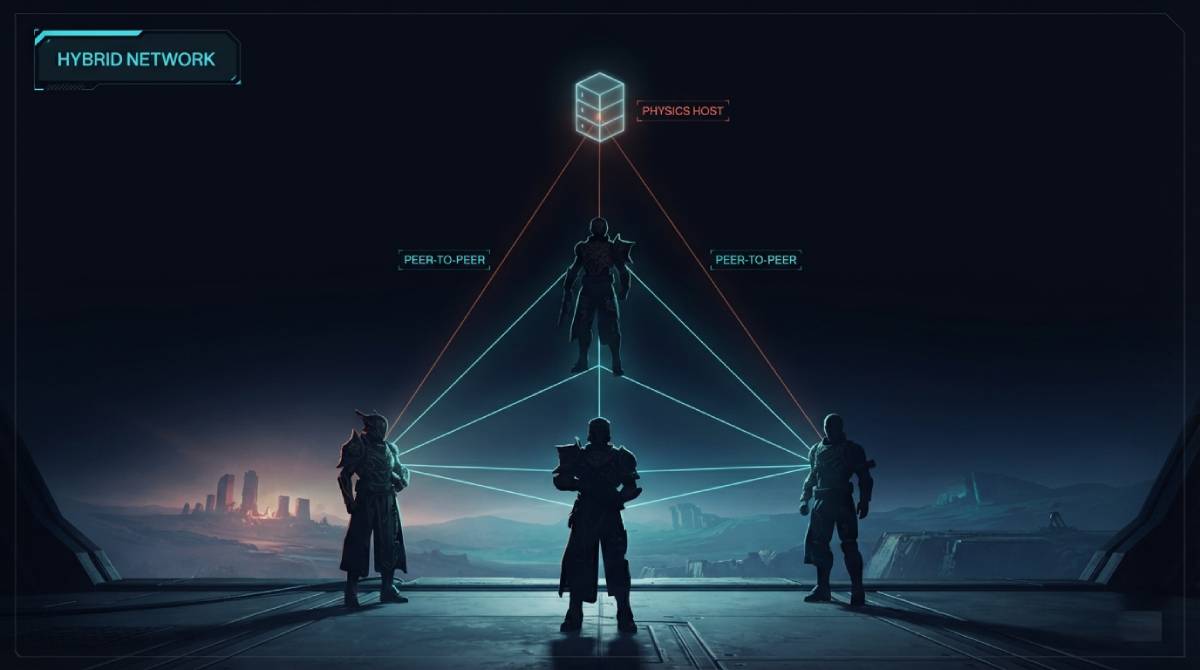
Every game we’ve covered so far shares one assumption underneath the technical details: there’s a dedicated server, and your client talks to it. Destiny 2 breaks that assumption entirely, and Bungie has been open about exactly how. It’s a genuine hybrid — part peer-to-peer, part dedicated server — and understanding the split matters if you’ve ever wondered why a standard ping test doesn’t seem to fully explain your in-game experience.
Two Systems Running at Once
Bungie has publicly confirmed the architecture: player movement and moment-to-moment interaction happen over direct peer-to-peer connections between clients, while a dedicated “physics host” server — not another player’s machine, a real Bungie-operated server — handles combat damage sampling at 30Hz. Player clients themselves broadcast movement directly to each other at up to 40Hz on PC. Two different systems, two different update rates, running simultaneously to produce what feels like one unified game.
Why Bungie Built It This Way
This wasn’t an accident or a legacy holdover — it’s a deliberate design choice that solves a real problem specific to Destiny 2’s structure. The game lets players stumble into each other seamlessly across a shared open world, without the traditional matchmaking-lobby model most shooters use. The peer-to-peer layer keeps that player-to-player movement responsive without routing everything through a central server first. Moving physics hosting to a dedicated server — a change from the original Destiny, which hosted physics on a player’s own machine — specifically fixed the host-migration problem that used to break sessions whenever the hosting player disconnected.
What This Means for a Ping Test
Here’s the part that actually changes how you should read your own results. A standard region ping test — including the one on this site — measures your connection to Bungie’s dedicated infrastructure, which is genuinely useful and accurate as far as it goes. But it doesn’t capture your direct peer-to-peer connection quality to whoever you happen to be matched against in a specific activity, and that varies match to match based on their location and ISP, not just yours. Independent testing has found Destiny 2’s actual measured input delay holds up reasonably well against pure dedicated-server shooters despite this added complexity — but “good ping to the region” and “good connection to this specific fireteam” aren’t quite the same guarantee here that they are in a simpler client-server game.
Test your baseline connection to Bungie’s regional infrastructure with our Destiny 2 ping test — it’s still the most useful single number available to you, even with the peer-to-peer layer added on top.
Related Guides
- Gamer Hub — All Game Ping Tests
- Destiny 2 Ping Test
- GTA Online Ping Test
- General Server Ping Test
- What Is a Good Ping for Gaming?
Frequently Asked Questions
Does Destiny 2 use dedicated servers or peer-to-peer?
Both, by Bungie’s own design. Player movement runs over direct peer-to-peer connections between clients, while a dedicated physics host server handles combat damage sampling at 30Hz — a deliberate hybrid, not a bug or a legacy leftover.
Why does my Destiny 2 connection feel different from match to match with the same ping?
Because of the peer-to-peer layer, your in-match experience partly depends on your direct connection to the specific players you’re matched with, not just your ping to Bungie’s servers. Two matches with identical regional ping can feel different if one set of teammates or opponents has a noticeably worse connection than another.