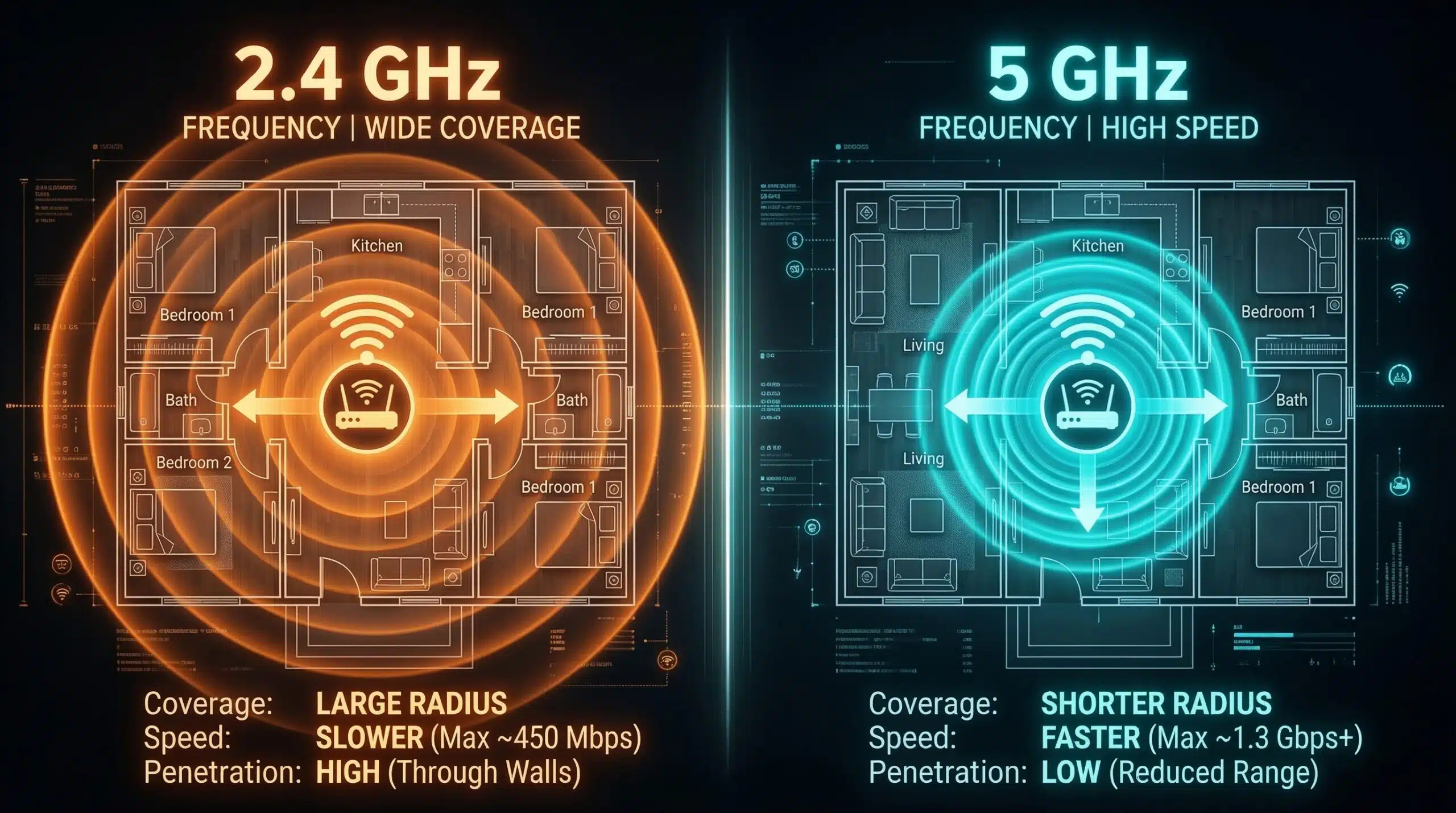
2.4 GHz vs 5 GHz WiFi — Which Band Should You Use?
Your WiFi router broadcasts on two (or three) frequency bands. Choosing the right band for each device has a significant impact on real-world performance. The 5 GHz band is faster with less interference; the 2.4 GHz band travels further and penetrates walls better. Test your WiFi performance on your current band with our free speed test.
2.4 GHz vs 5 GHz vs 6 GHz — Full Comparison
| Feature | 2.4 GHz | 5 GHz | 6 GHz (WiFi 6E) |
|---|---|---|---|
| Max Speed | 600 Mbps (WiFi 4) | 3.5–9.6 Gbps | 9.6 Gbps |
| Real-World Speed | 50–200 Mbps | 200–800 Mbps | 300–1000+ Mbps |
| Range / Coverage | Excellent | Good | Limited |
| Wall Penetration | Excellent | Moderate | Poor |
| Interference | High (crowded spectrum) | Moderate | Low (fresh spectrum) |
| Channel Width | 20–40 MHz | 20–160 MHz | 20–320 MHz |
| Best For | Smart home, distant devices | Streaming, gaming, calls | Close-range, max speed |
The Simple Rule — When to Use Each Band
Use 5 GHz when: your device is within 15 meters of the router with few walls between; you’re gaming, streaming 4K, or video calling; your device is fast enough to benefit (modern laptop, phone, gaming console). Use 2.4 GHz when: your device is far from the router or on a different floor; the device passes through many walls; you’re using an IoT device (smart plug, sensor, doorbell) that doesn’t need speed. This band selection alone can explain the difference between getting 50 Mbps and 300 Mbps from the same router and internet plan.
Why 2.4 GHz Is So Congested
The 2.4 GHz band has only three non-overlapping channels (1, 6, and 11). In an apartment building, every router within range broadcasts on these same three channels — creating significant interference that reduces all devices’ throughput. Microwaves and Bluetooth devices also operate at 2.4 GHz, adding further interference. If you’re experiencing WiFi issues and live in a dense area, switching to 5 GHz is often an instant improvement. If you’re experiencing issues on 5 GHz, our WiFi improvement guide covers optimization steps.
Related Guides
- WiFi 6 vs WiFi 5
- Wired vs Wireless Internet Speed
- Does Router Placement Affect Speed?
- WiFi Slow on Laptop But Fast on Phone
- How to Improve WiFi in a Large House
- How to Boost WiFi Signal
Frequently Asked Questions
Why is 5 GHz faster than 2.4 GHz?
5 GHz supports wider channel widths (up to 160 MHz vs 40 MHz) and less crowded spectrum, allowing more data per second. The higher frequency carries more information per wave. However, higher frequency also means shorter range and worse penetration through physical objects — the tradeoff between speed and range.
My phone shows 5 GHz but is still slow — why?
Connecting to the 5 GHz band is necessary but not sufficient for good speeds. You also need: strong signal (being too far from router degrades 5 GHz faster than 2.4 GHz), a non-congested channel, no interference from neighboring 5 GHz networks, and your internet plan must be fast enough. If 5 GHz is slow despite close proximity, try manually selecting a less congested channel in your router settings. See our WiFi troubleshooting guide for diagnostics.
Can I use both 2.4 GHz and 5 GHz simultaneously?
Yes — most modern routers broadcast both bands simultaneously. Different devices connect to whichever band their hardware prefers or you assign. With Smart Connect enabled, the router automatically steers devices to the optimal band. Manually splitting the bands (giving them different network names) gives you more control over which devices use which band.