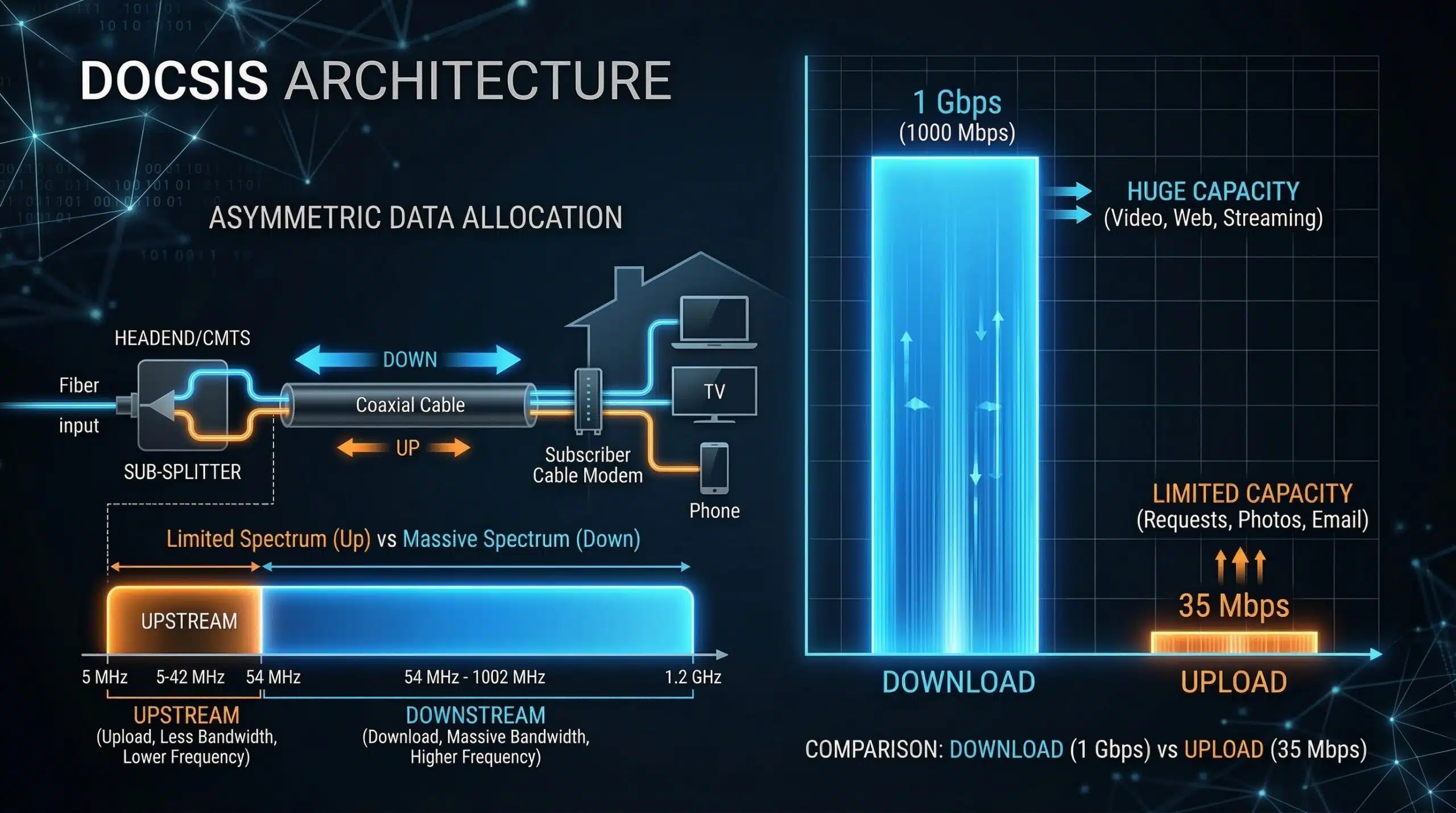
Why Is My Upload Speed So Much Slower Than Download?
Getting 300 Mbps download but only 15 Mbps upload? This isn’t a fault — it’s intentional design. Cable internet uses asymmetric architecture that prioritizes download over upload. Understanding why this happens helps you decide whether your upload is adequate or whether switching to fiber solves the real constraint. Test both at instantspeedtest.net/.
Why Cable Upload Is Structurally Limited
DOCSIS (Data Over Cable Service Interface Specification) — the technology that cable internet runs on — allocates much more frequency spectrum to downstream (download) channels than upstream (upload) channels. This was intentional: when cable internet launched in the 1990s, household internet use was almost entirely download (loading web pages, downloading files). Upload needs were minimal. DOCSIS 3.1 improved upload capabilities but the fundamental spectrum allocation still heavily favors download. A typical DOCSIS 3.1 cable plan offers 10–30 Mbps upload on a 500 Mbps download plan — a 20:1 ratio. This contrasts with fiber, where 500 Mbps means 500 Mbps both ways.
Upload Speed by Connection Type — Comparison
| Connection Type | Typical Download | Typical Upload | Upload Ratio |
|---|---|---|---|
| Cable (DOCSIS 3.1) | 100–500 Mbps | 10–30 Mbps | 1:10–1:20 |
| Cable (DOCSIS 3.1 Multi-Gig) | 1–2.5 Gbps | 50–200 Mbps | 1:5–1:20 |
| Fiber | 100 Mbps–1 Gbps | 100 Mbps–1 Gbps | 1:1 (symmetric) |
| DSL (ADSL2+) | 24 Mbps | 3.5 Mbps | 1:7 |
| 5G Home Internet | 100–300 Mbps | 15–50 Mbps | 1:4–1:8 |
When to Care About Upload Speed — and When Not To
Don’t worry about upload if you primarily stream, browse, and game — these are download-dominant activities using under 3 Mbps upload. Do worry about upload if you: video call daily (5 Mbps per call); Twitch stream (6–10 Mbps); upload large files or videos frequently; run security cameras (3–15 Mbps per camera); or work from home with VPN (10–20 Mbps needed). For remote workers and content creators, cable’s upload constraint is a genuine quality-of-life problem that only switching to fiber fully solves.
Related Guides
- What Is Upload Speed?
- What Is a Good Upload Speed?
- Fiber vs Cable Internet
- Good Internet Speed for Working From Home
- Internet Speed for Twitch Streaming
- Good Upload Speed for YouTube
Frequently Asked Questions
Can I increase upload speed on cable internet?
To a limited extent. Upgrading to a higher-tier cable plan typically provides better upload — a 1 Gbps cable plan may offer 50–100 Mbps upload vs 15 Mbps on a 300 Mbps plan. Closing background upload-consuming apps (cloud sync, automatic backups) frees existing upload capacity. But the fundamental ceiling is set by DOCSIS spectrum allocation — cable cannot deliver symmetric speeds without hardware infrastructure upgrades to DOCSIS 3.1 or DOCSIS 4.0.
Is DOCSIS 4.0 the solution to slow cable upload?
Yes — DOCSIS 4.0 enables “full duplex” or “extended spectrum” modes that dramatically improve upload capacity, with symmetrical speeds up to 10 Gbps. Major US cable operators began DOCSIS 4.0 deployments in 2023–2024. Availability varies by location. Where deployed, DOCSIS 4.0 brings cable upload performance much closer to fiber. Check your ISP’s website for DOCSIS 4.0 availability in your area.
Does slow upload speed affect gaming?
For online gaming — minimally. Active gameplay uses only 1–3 Mbps upload regardless of game. Even 5 Mbps upload is more than sufficient for gaming. Slow upload becomes a gaming issue only when you’re also streaming on Twitch (requires 6–10 Mbps upload) at the same time, or if multiple gamers share the same connection simultaneously.