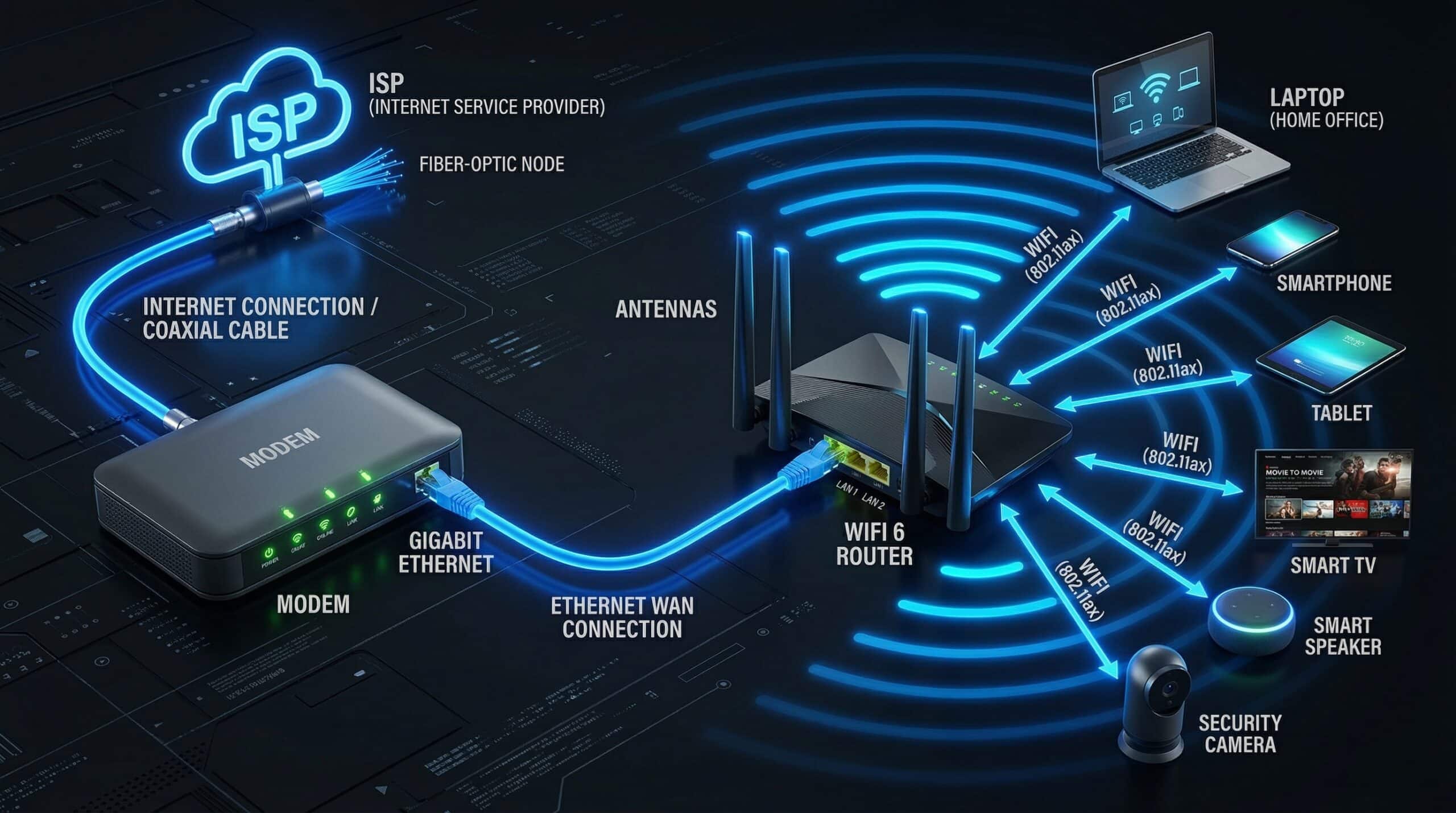
Modem vs Router — What’s the Difference?
A modem connects your home to your ISP’s network. A router creates your home network and connects all your devices together. They are fundamentally different devices with different jobs, though ISPs often provide a combined modem-router (gateway) unit. Understanding the difference helps you troubleshoot problems, make smarter equipment decisions, and save money. Test your current connection speed with our free internet speed test.
Modem vs Router — Functions Explained
| Device | Function | Connects To | Your Devices See It As |
|---|---|---|---|
| Modem | Translates ISP signal to Ethernet | ISP’s network (coax/phone line) | Not directly |
| Router | Creates home network, manages traffic | Modem (and your devices) | WiFi access point + default gateway |
| Gateway (combo) | Both functions in one device | ISP & all home devices | WiFi + internet source |
Should You Rent or Buy Your Own Equipment?
ISPs charge $10–15/month to rent their gateway device. Buying your own modem + router pays for itself in 12–18 months. A good DOCSIS 3.1 modem costs $80–120; a quality WiFi 6 router costs $100–200. Owning also lets you choose better-performing hardware. The catch: confirm your modem is on your ISP’s approved device list before purchasing. Fiber internet customers typically must use the ISP-provided ONT (optical modem) but can use their own router. Understanding how routers affect internet speed shows why equipment quality matters.
When Your Router Causes Slow Internet
If your modem delivers full plan speed when connected directly but your devices are slow, the router is the bottleneck. Common router issues: outdated firmware, processor overload from too many connected devices, wrong channel selection causing WiFi interference, or simply aging hardware that can’t handle modern speeds. Upgrading an old router is often the highest-impact improvement you can make. See our guide on how to speed up a slow router for fixes before purchasing new hardware.
Related Guides
- Does a Router Affect Internet Speed?
- What Is a Mesh WiFi System?
- How to Speed Up a Slow Router
- Does Router Placement Affect Speed?
- What Is Cable Internet?
- What Is Fiber Internet?
Frequently Asked Questions
Can I use any router with any modem?
Yes — any router connects to any modem via Ethernet. The router doesn’t need to be matched to your modem or ISP. The modem must be compatible with your ISP’s network (cable modems must be on the ISP’s approved DOCSIS device list). Fiber customers typically use the ISP’s ONT (which you can’t replace) and connect their own router to it.
What happens if I only have a router and no modem?
Without a modem, you have a local network but no internet access. The router manages traffic between devices on your network, but it can’t connect to your ISP without a modem to translate the ISP’s signal. The exception is fiber — some fiber setups provide an Ethernet jack directly from the ONT, allowing a router to connect without a separate modem visible to you.
Is a modem-router combo good or bad?
Combo units are convenient but limiting. They combine two functions in one device, meaning both must be replaced when either becomes outdated. Separate modem and router give you more flexibility and typically better performance. However, for typical households, the ISP’s combo gateway unit is adequate and eliminates setup complexity. Power users and gamers benefit most from separate, optimized hardware.